
Getting money in and out of your SunZee1 account should be simple, fast, and stress-free. This guide covers everything: how to deposit, how to withdraw, which payment methods work, how long it takes, and what to do if something goes wrong.
Before You Start – Quick Checklist
Before making your first deposit or withdrawal, confirm the following:
- Your SunZee1 account is fully registered and verified
- You are logged in at sunzee1.com (not a look-alike site)
- Two-factor authentication (2FA) is enabled
- Your withdrawal whitelist is set up with your correct account details
- Your JazzCash or EasyPaisa account is active and working
Supported Payment Methods in Pakistan
SunZee1 supports the payment methods Pakistani users already use daily — no international cards or complicated setups required.
| Method | Deposit | Withdrawal | Speed |
|---|---|---|---|
| JazzCash | ✅ Yes | ✅ Yes | Fast |
| EasyPaisa | ✅ Yes | ✅ Yes | Fast |
| Bank Transfer | ✅ Yes | ✅ Yes | Same day |
| Crypto (On-chain) | ✅ Yes | ✅ Yes | Minutes |
Always check the Wallet section of your dashboard for the most current payment options available to your account.
How to Deposit Money into SunZee1 — Step by Step
Step 1 — Open Your Wallet
Log in to your SunZee1 account and tap “Wallet” from your dashboard menu.
Step 2 — Tap Deposit
Select the “Deposit” option from your wallet screen.
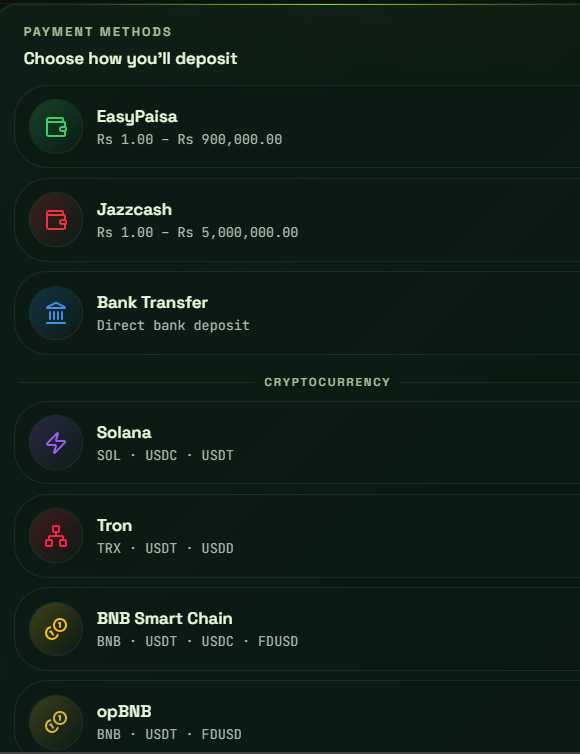
Step 3 — Choose Your Payment Method
Select from JazzCash, EasyPaisa, Bank Transfer, or Crypto depending on what is available for your account.
Step 4 — Enter the Amount
Type in the exact amount you want to deposit. Make sure it meets the minimum deposit requirement for your chosen plan tier.
Step 5 — Complete the Payment
Follow the on-screen instructions for your chosen method:
JazzCash:
- You will receive a payment prompt on your registered JazzCash number
- Confirm the payment using your JazzCash PIN
- Do not close the app until confirmation appears
EasyPaisa:
- Complete the payment through your EasyPaisa app or via USSD (*786#)
- Use the account number and reference provided on screen
- Save your transaction ID
Bank Transfer:
- Transfer to the SunZee1 bank account details shown on screen
- Use your SunZee1 account ID as the payment reference
- Keep your bank transfer receipt
Crypto:
- Send to the wallet address shown on your deposit screen
- Double check the address before confirming — crypto transactions cannot be reversed
- Wait for blockchain confirmation
Step 6 – Confirm Your Deposit
After completing payment, tap “I Have Paid” or “Confirm Deposit” on the SunZee1 screen and submit your payment reference or transaction ID.
Step 7 — Wait for Confirmation
Your wallet balance will update once the payment is verified. This typically takes:
| Method | Confirmation Time |
|---|---|
| JazzCash | 5–15 minutes |
| EasyPaisa | 5–15 minutes |
| Bank Transfer | 30 minutes–2 hours |
| Crypto | 10–30 minutes |
How to Activate an Investment Plan After Depositing
Depositing money adds funds to your main wallet – it does not automatically start earning. You need to activate a plan:
- Go to “Plans“ in your dashboard
- Browse available plan tiers
- Select the plan that matches your budget and goals
- Enter the amount you want to invest
- Tap “Invest Now” and confirm
Your plan activates immediately. Your first hourly profit credit will appear within 60 minutes.
How to Withdraw Money from SunZee1 — Step by Step
Step 1 — Open Your Wallet
Log in and navigate to the “Wallet” section of your dashboard.
Step 2 — Tap Withdraw
Select the “Withdraw” button from your wallet options.
Step 3 — Select Your Withdrawal Method
Choose JazzCash, EasyPaisa, Bank Transfer, or Crypto from the available options.
Step 4 — Enter Your Account Details
Type in your:
- JazzCash or EasyPaisa mobile number, or
- Bank account number and title, or
- Crypto wallet address
Important: Only accounts on your withdrawal whitelist can receive funds. Set up your whitelist in Security Settings before your first withdrawal.
Step 5 — Enter the Amount
Type the exact amount you want to withdraw. Make sure it meets the minimum withdrawal threshold.
Step 6 — Verify and Confirm
- Complete your 2FA verification if enabled (strongly recommended)
- Review all details carefully — account number, amount, method
- Tap “Confirm Withdrawal”
Step 7 — Wait for Processing
| Method | Processing Time |
|---|---|
| JazzCash | 1–3 hours |
| EasyPaisa | 1–3 hours |
| Bank Transfer | 2–8 hours |
| Crypto | 15–60 minutes |
You will receive a notification when your withdrawal is processed and funds are sent.
Withdrawal Whitelist — What It Is and Why It Matters
The withdrawal whitelist is one of SunZee1’s most important security features. It means only pre-approved accounts can receive your withdrawals — even if someone gains access to your password, they cannot send your money anywhere that is not already whitelisted.
How to set up your whitelist:
- Go to Settings → Security → Withdrawal Whitelist
- Add your JazzCash number, EasyPaisa number, or bank account
- Verify using your 2FA code
- Your whitelisted account is now the only destination for withdrawals
Set this up before you make your first deposit. It takes two minutes and protects everything.
Minimum Deposit and Withdrawal Amounts
| Transaction | Minimum Amount |
|---|---|
| Deposit | Matches your chosen plan minimum |
| Withdrawal | Check current threshold in your dashboard |
Exact minimums are displayed inside your account dashboard and may be updated periodically. Always check before transacting.
Tips for Smooth Transactions Every Time
For Deposits:
- Always save your transaction ID or payment screenshot before leaving the payment screen
- Use your SunZee1 account ID as the reference when making bank transfers
- Never send payment to any account other than what is shown inside your official SunZee1 dashboard
- Make sure your JazzCash or EasyPaisa account has sufficient balance before starting
For Withdrawals:
- Double-check your account number before confirming — especially for bank transfers
- Enable 2FA before your first withdrawal for maximum security
- Withdraw during business hours for fastest bank transfer processing
- Keep your withdrawal whitelist updated if you change mobile wallets or bank accounts
Common Issues and How to Fix Them Fast
Deposit Not Reflecting in Wallet
What to do:
- Wait 15–30 minutes — most deposits process within this window
- Check that you submitted the correct transaction ID after paying
- Take a screenshot of your payment confirmation from JazzCash or EasyPaisa
- Contact support@sunzee-1.pk or use in-app support with your payment proof
Do not make a second deposit until your first one is resolved. Contact support first.
Withdrawal Not Received
What to do:
- Check your withdrawal status inside your dashboard wallet section
- Confirm you withdrew to a whitelisted account
- Wait the full processing window for your method before escalating
- Contact support with your withdrawal reference number if it exceeds the expected timeframe
Payment Method Not Available
What to do:
- Check your dashboard for currently available methods — options may vary by account
- Try an alternative payment method
- Contact support if no methods appear available for your account
Forgot to Submit Transaction ID After Paying
What to do:
- Go back to the deposit section and look for a pending deposit option
- Contact support immediately with your payment screenshot
- Do not make another payment before speaking to support
2FA Code Not Working During Withdrawal
What to do:
- Make sure your phone’s time is set to automatic (incorrect device time causes 2FA failures)
- Request a new code and try again
- If still failing, contact support through the in-app support channel
Security Reminders – Protect Your Money
Only transact at sunzee1.com — never on look-alike sites
SunZee1 will never ask for your password through any channel
Enable 2FA before your first deposit
Set up your withdrawal whitelist immediately after registration
Never share your OTP or 2FA code with anyone — including people claiming to be SunZee1 support
Screenshot every transaction for your own records
Frequently Asked Questions
How long does a deposit take?
JazzCash and EasyPaisa deposits typically reflect within 5–15 minutes. Bank transfers take 30 minutes to 2 hours.
Is there a fee for depositing or withdrawing?
Check the current fee structure inside your dashboard wallet section as applicable fees may vary by payment method.
Can I withdraw to a different account than I deposited from?
Yes — as long as the withdrawal account is on your approved whitelist. You are not required to withdraw to the same account you deposited from.
Can I deposit and withdraw on the same day?
Yes. There is no restriction on same-day deposits and withdrawals, subject to your account status and plan terms.
What is the fastest withdrawal method?
Crypto withdrawals are typically processed fastest. For Pakistani bank wallet users, JazzCash and EasyPaisa withdrawals are usually completed within 1–3 hours.
My withdrawal was rejected — what do I do?
Check your dashboard for the rejection reason. Common causes include unwhitelisted account details or unmet minimum withdrawal amounts. Contact support if the reason is unclear.
Can I cancel a withdrawal after submitting?
Once confirmed, withdrawals cannot typically be cancelled as processing begins immediately. Always double-check your details before confirming.
Is there a daily withdrawal limit?
Current withdrawal limits are displayed inside your dashboard. Limits may vary based on your account verification level and plan tier.
Need Help?
| Contact Method | Best For |
|---|---|
| In-app Support | Fastest — account-specific issues |
| support@sunzee-1.pk | Detailed deposit/withdrawal queries |
| security@sunzee-1.pk | Suspicious activity or security concerns |
Have your transaction ID, payment screenshot, and registered mobile number ready for the fastest possible resolution.